Introduction to Virtualization
Virtualization in cloud computing refers to the technique of creating virtual versions or representations of various computing resources such as servers, storage devices, networks, and operating systems. Virtualization is a process that allows a computer to share its hardware resources with multiple digitally separated environments. Each virtualized environment runs within its allocated resources, such as memory, processing power, and storage. It involves abstracting the physical infrastructure and dividing it into multiple virtual environments that can be used independently by different users or applications.
Fig: Concept of Virtualization
The virtualization process utilizes specialized software called hypervisors or virtual machine monitors to create and manage virtual machines. These virtualized entities operate as self-contained units complete with their own operating system and applications while sharing the underlying physical resources.
Virtualization involves the installation of a hypervisor, which acts as an intermediary between the program and the underlying hardware. Once a hypervisor is installed, the software uses virtual representation of computer components such as virtual processors rather than actual processors.
Hypervisor (VMM)
The hypervisor is a software component that manages multiple virtual machines in a computer. It ensures that each virtual machine gets the allocated resources and does not interfere with the operation of other virtual machines. Hypervisor is also known as Virtual Machine Monitor (VMM). It is a software layer that sits between the operating system and the hardware. It provides the services and functionality required for the seamless operation of several OSs. It detects traps, reacts to privileged CPU instructions, and manages hardware request queuing, dispatching and return.

Fig: Hypervisor
Type 1 Hypervisor
It is a hypervisor program installed directly on the computer's hardware instead of the operating system. Therefore, type 1 hypervisors have better performance and are commonly used by enterprise applications. This type of hypervisor is also called "bare metal". On the top of this, we can install many virtual machines. The machines are not connected in any way and can have different instances of OS and acts as a different application servers. It is highly secure.
Example: Oracle VM, Microsoft Hyper-V etc.
Type 2 Hypervisor
It is installed on an operating system. Type 2 hypervisors are suitable for end-user computing.
It allows users to utilize their personal computer OS server as a host for VM. Type 2 hypervisors are primarily used on a client system where efficiency is not as important or on systems where support for a wide range of I/O devices is required. This is less secured than Type 1 hypervisor.
Example, VMware Server, Microsoft Virtual PC, etc.

Fig: Types of Hypervisors
Type 1 vs Type 2 Hypervisors
Comparison of Hypervisors
| Feature | Type 1 Hypervisor (Bare Metal) | Type 2 Hypervisor (Hosted) |
|---|---|---|
| Description | A hypervisor that runs directly on host hardware to control the hardware and to manage guest OS. | A hypervisor that runs on a conventional operating system just as other computer programs do. |
| Performance | Faster, high performance as there is no middle layer. | Slower, comparatively reduced performance. |
| Scalability | Better scalability. | Not so much, because it is reliant on the underlying OS. |
| Virtualization Type | Hardware virtualization. | OS virtualization. |
| Example | Microsoft Hyper-V. | VMware Workstation. |
Virtual Machine (VM)
A virtual machine is a software-defined computer that runs on a physical computer with a separate operating system and computing resources. The physical computer is called the host machine and virtual machines are guest machines. Multiple virtual machines can run on a single physical machine. Virtual machines are abstracted from the computer hardware by a hypervisor.
Benefits of Virtualization
-
Efficient resource use
Virtualization improves hardware resources used in data center. For example, instead of running one server on one computer system, we can create a virtual server pool on the same computer system as required. Having fewer underlying physical servers frees up space in data center and saves money on electricity, generators, and cooling appliances.
-
Automated IT management
Now that physical computers are virtual, we can manage them by using software tools. Administrators create deployment and configuration programs to define virtual machine templates. We can duplicate our infrastructure repeatedly and consistently and avoid error-prone manual configurations.
-
Faster disaster recovery
When events such as natural disasters or cyberattacks negatively affect business operations, regaining access to IT infrastructure and replacing or fixing a physical server can take hours or even days. By contrast, the process takes minutes with virtualized environments. This prompt response significantly improves resiliency and facilitates business continuity so that operations can continue as scheduled.
-
Cheaper
Because virtualization does not need the usage or installagion of physical hardware components.
-
Allows for faster deployement of resources
There is no longer requirement to establish physical machines, local networks or other information technology components.
-
Better business continuation
Allows employees to access software, data and communications from anywhere, and it can allow several poeple to access the same information for greater continuity.
-
Promotes digital enterpreneurship
Almost anybody can start their side hustle or become a company owner today, thanks to the many platforms, servers and storage devices that are accessible.
Disadvantages of Virtualization
-
High Initial Investment
While virtualization reduces costs in the long run, the initial setup costs for storage and servers can be higher than a traditional setup.
-
Complexity
Managing virtualized environments can be complex, especially as the number of VMs increases.
-
Security Risks
Virtualization introduces additional layers, which may pose security risks if not properly configured and monitored.
-
Learning New Infrastructure
As Organization shifted from Servers to Cloud. They required skilled staff who can work with cloud easily. Either they hire new IT staff with relevant skill or provide training on that skill which increase the cost of company.
-
Data can be at Risk
Working on virtual instances on shared resources means that our data is hosted on third party resource which put's our data in vulnerable condition. Any hacker can attack on our data or try to perform unauthorized access. Without Security solution our data is in threaten situation.
Types of Virtualization
1. Server Virtualization
Server virtualization is a process that partitions a physical server into multiple virtual servers, each running its own operating system and applications. It is an efficient and cost-effective way to use server resources and deploy IT services in an organization, allows to share same physical resources with multiple users or applications. Without server virtualization, physical servers use only a small amount of their processing capacities, which leave devices idle.
Example: VMware, VSphere, Microsoft Hyper V
Benefits
- Higher Server ability.
- Cheaper operating costs
- Eliminate server complexity
- Increased application performance
2. Storage Virtualization
Storage virtualization is the technique of combining physical storage from numerous network storage devices to appear as a single storage unit. IT administrators can streamline storage activities, such as archiving, backup, and recovery, because they can combine multiple network storage devices virtually into a single storage device.
Example: EMC ViPr, Open Stack Cinder
Benefits
- Centralized management of storage resources.
- Simplified administration.
- Increased storage efficiency.
- Improved data availability and disaster recovery.
3. Network Virtualization
Any computer network has hardware elements such as switches, routers, and firewalls. An organization with offices in multiple geographic locations can have several different network technologies working together to create its enterprise network. Network virtualization is a process that combines all of these network resources to centralize administrative tasks. Administrators can adjust and control these elements virtually without touching the physical components, which greatly simplifies network management.
Example: VMware NSX, Cisco ACI
Benefits
- Enhanced flexibility, scalability and isolation
- Simplified network management
4. Desktop Virtualization
Desktop virtualization involves delivering desktop environments to end-users from a centralized server. The user's desktop environment is virtualized and runs on a server, and the user accesses it remotely using the client's or other devices. Desktop virtualization provides flexibility, security, and simplified management of desktop environments. This form of virtualization is beneficial for development and testing teams who need to build or test programs on many operationg systems.
Example: VMware, Horizon, Citrix Virtual Apps and Desktops.
Benefits
- Centralized management and delivery of desktop environments,
- Reduced administration efforts,
- Enhanced security,
- Access to desktop environments from various devices.
5. Application Virtualization
Application virtualization software allows users to access and use an application from a separate computer than the one on which the application is installed. Using application virtualization software, IT admins can set up remote applications on a server and deliver the apps to an end user's computer. For the user, the experience of the virtualized app is the same as using a locally installed app on a personal computer. Application virtualization pulls out the functions of applications to run on operating systems other than the operating systems for which they were designed. With application virtualization, a Linux user can use a Windows application without installing it on Linux, by accessing or streaming it from a Windows server where the app is actually installed and running.
Examples: Citrix Virtual Apps, Microsoft App-V, VMware ThinApp, Docker containers, Amazon AppStream.
Benefits
- Siplified application deployement
- Increased portability and compatibility.
- Efficient utilization of resources.
6. Data Virtualization
Data virtualization involves creating a unified view of data from multiple sources, such as databases, files, or web services, without physically moving or copying the data. Data virtualization provides a layer of abstraction that allows applications to access and manipulate data from different sources as if it were in a single location.
Example: Denodo, Oracle Data Virtualization.
Benefits
- Unified view of data from various sources,
- Easy data integration and access,
- Reduced data duplication and redundancy,
- Real-time data access and analysis.
Types of Server and Machine Virtualization
1. Full Virtualizaton
In full virtualization, the hypervisor completely emulates the underlying hardware, allowing multiple virtual machines (VMs) to run their own operating systems without modification. This setup enables the creation of multiple virtual servers from a single physical server, enhancing resource utilization and reducing the need for additional physical servers. Each VM operates as if it were running on its own dedicated physical server. This type of virtualization ensures maximum isolation between VMs, making it highly secure and flexible.
Pros
- Full OS and hardware emulation.
- Supports any operating system.
Cons
Performance overhead due to hardware emulation.
2. Para-Virtualization
Para-virtualization modifies the guest operating systems so they are aware of the hypervisor.
Unlike full virtualization, where the hypervisor fully emulates hardware, para-virtualization optimizes communication between the OS and the hypervisor, reducing overhead. This results in better performance compared to full virtualization. However, the guest OS must be specifically designed or modified to work in a para-virtualized environment, limiting its compatibility.
Pros
- Better performance compared to full virtualization.
Cons
- Requires modification to the guest OS.
Full Virtualization vs. Para Virtualization
| Feature | Full Virtualization | Para-Virtualization |
|---|---|---|
| Definition | A virtual machine permits the execution of instructions with the running of an unmodified OS in an entirely isolated way. | The virtual machine does not implement full isolation of the OS, but rather provides a different API which is utilized when the OS is subject to alteration. |
| Technique of Operation | Binary Translation and a direct approach. | Hypercalls at compile time. |
| Security | Less secure. | More secure. |
| Speed/Performance | Slower. | Faster. |
| Portability & Compatibility | More portable and compatible. | Less portable and compatible. |
| Examples | Microsoft and Parallel systems. | VMware and Xen. |
3. OS-Level Virtualization
In OS-level virtualization, also known as containerization, all virtual environments share the same operating system kernel, but they operate in isolated user spaces. This form of virtualization is much more lightweight than both full and para-virtualization because it doesn't require a full OS for each VM. Containers, like those provided by Docker, can be spun up almost instantly, making them ideal for applications that need to scale rapidly.
Pros
- Minimal resource overhead.
- Fast deployment and scaling.
Cons
- All containers must run the same OS kernel.
Types of Storage Virtualization
1. Block-Level Virtualization
Block-level storage virtualization works at a low level. It breaks storage into fixed-size blocks and manages these blocks across multiple storage devices as if they were one. The operating system does not know where the data is actually stored; it just sees virtual disks. This type is very fast and is commonly used for databases and virtual machines where performance is important.
2. File-Level Virtualization
File-level storage virtualization works at a higher level. It manages files and folders instead of raw blocks. Users and applications access files through a virtual file system, while the system decides where the files are physically stored. This makes it easier to move, share, and organize files, and it is commonly used in network file storage systems like NAS.
Implementation Levels of Virtualization Structures
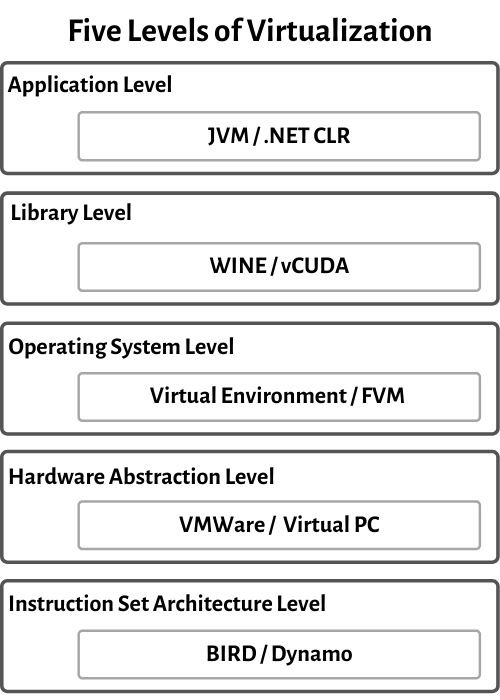
1. Instruction Set Architecture Level
In this level, virtualization in ISA is accomplished by ISA emulation. This is useful for running large amounts of legacy code that was originally developed for various hardware configurations. These programs can be executed on the virtual machine through an ISA. The fundamental emulation requires the use of an interpreter. This translator translates the source code and translates it into a hardware-readable format for processing.
2. Hardware Abstraction Level
Hardware level virtualization occurs directly on the top of the hardware. This method creates a virtual hardware environment for a virtual machine and utilizes the underlying hardware through virtualization. The goal is to virtualize the resources of computers such as processors, memory, and I/O devices.
3. Operating System Level
The virtualization at operating system level establishes an abstraction layer between the programs and the OS. It functions as a separate container on the actual server and operating system. Utilizing hardware and software to allocate hardware resources, OS level virtualization is often utilized in the creation of virtual environments. Every user gets their virtual environment with their virtual hardware resources.
4. Libraries Support Level
Instead of OS-long system calls, most programs use APIs revealed by user-level libraries as most system have well-documented APIs. Virtualization using library interfaces is achieved by using API hooks to regulate the communication channel between programs and the rest of the system. This concept has been applied by the software utility WINE to support Windows programs on top of Unix hosts.
5. Application Level
At application level, the entire environment of the platform does not need to be virtualized. As application runs as a single process on a computer operating system, this can also be referred to as a process-level virtualization. The most popular approach is to deploy high-level language VMs.
Virtualization Software
Virtualization software refers to a set of technologies and tools that enable the creation and management of virtual machines (VMs) or virtual environments on a physical computer or server. It allows multiple operating systems (OS) and applications to run simultaneously on a single hardware platform, sharing its resources such as memory, processing power, and storage.
Virtualization software creates a layer of abstraction between the underlying hardware and the virtual machines, allowing each VM to operate independently as if it were running on its dedicated physical machine. This abstraction enables better resource utilization, scalability, and flexibility in managing and deploying applications and services.
The virtualization software typically consists of a hypervisor responsible for managing and allocating the hardware resources to the virtual machines.
Example: VirtualBox, VMware Workstation, Linux runnig on top of Windows.
Load Balancing
Load balancing refers to the process of distributing a set of tasks over a set of resources with the aim of making their overall processing more efficient. Load balancing can optimize the response time and avoid unevenly overloading some computed nodes while other nodes are left idle. It refers to distributing incoming network traffic across a group of backend servers. Load balancing is an essential technique used in cloud computing to optimize resource utilization and ensure that no single resource is overburdened with traffic. It is a process of distributing workloads across multiple computing resources, such as servers, virtual machines, or containers, to achieve better performance, availability, and scalability.
Load balancer performs the following functions
- Distributes the client request or network load efficiently across multiple servers
- Ensures high availability and reliability by sending requests only to servers that are online
- Provides flexibility to add or subtract servers as demand.
Benefits
- Reduced downtime
- Improved Performance
- Scalable - helps to handle spikes in traffic or changes in demand.
- Flexible
- Efficient resource utilization.
Disadvantages
- Complexity in implementing in cloud computing.
- Can increase overall cost of cloud computing.
- It can also become a single point of failure if not implemented correctly.
- Can introduce security risks if not implemented correctly, such as allowing unauthorized access or exposing sensitive data.
Infrastructure Requirement for Virtualization
Virtualization products have strict requirements on backend infrastructure components, including storage, backup, system management, security, and time sync, ensuring that these components require critical configuration for successful implementation.
Physical Requirements
- Hardware: 64-bit CPU with virtualization support (Intel VT-x / AMD-V), sufficient RAM, and high-speed storage.
- Software: Hypervisor (Type 1 or Type 2), host OS (if required), and compatible guest OS.
- Networking: Network interface cards, virtual switches, VLAN/NAT support.
- Storage: Local or shared storage (SAN/NAS), RAID, snapshot support.
- Management & Security: VM management tools, monitoring, access control, backups.
- Power & Cooling: Reliable power supply and adequate cooling.
Key Components
A virtual infrastructure typically consists of these key components:
Virtualized compute:
This component offers the same capabilities as physical servers, but with the ability to be more efficient. Through virtualization, many operating systems and applications can run on a single physical server, whereas in traditional infrastructure servers were often underutilized. Virtual compute also makes newer technologies like cloud computing and containers possible.
Virtualized storage:
This component frees organizations from the constraints and limitations of hardware by combining pools of physical storage capacity into a single, more manageable repository. By connecting storage arrays to multiple servers using storage area networks, organizations can bolster their storage resources and gain more flexibility in provisioning them to virtual machines. Widely used storage solutions include fiber channel SAN arrays, iSCSI SAN arrays, and NAS arrays.
Virtualized networking and security:
This component decouples networking services from the underlying hardware and allows users to access network resources from a centralized management system. Key security features ensure a protected environment for virtual machines, including restricted access, virtual machine isolation and user provisioning measures.
Management solution:
This component provides a user-friendly console for configuring, managing and provisioning virtualized IT infrastructure, as well automating processes. A management solution allows IT teams to migrate virtual machines from one physical server to another without delays or downtime, while enabling high availability for applications running in virtual machines, disaster recovery and back-up administration.
Steps to follow for long term value
Plan ahead:
When designing a virtual infrastructure, IT teams should consider how business growth, market fluctuations and advancements in technology might impact their hardware requirements and reliance on compute, networking and storage resources.
Look for ways to cut costs:
IT infrastructure costs can become unwieldly if IT teams don't take the time to continuously examine a virtual infrastructure and its deliverables. Cost-cutting initiatives may range from replacing old servers and renegotiating vendor agreements to automating time-consuming server management tasks.
Prepare for failure:
Despite its failover hardware and high availability, even the most resilient virtual infrastructure can experience downtime. IT teams should prepare for worst-case scenarios by taking advantage of monitoring tools, purchasing extra hardware and relying on clusters to better manage host resources.